 Listicle
What's the Best Card Reader for Seasonal Retail?
Last Updated: November 1, 2026
Quick Summary
The best card reader for seasonal retail balances hardware cost, monthly fees, and how often you actually sell. Intermittent sellers usually win with a low-cost mobile card reader with no monthly fee, while a permanent location running a busy season justifies a countertop terminal or POS system.
- PayPal Zettle costs $29 and SumUp about $39, both suited to occasional or intermittent sellers.
- Mobile readers trade off battery life, connectivity, and offline mode when selling outdoors.
- Multiply your seasonal volume by the per-transaction rate to compare no-monthly-fee readers against subscriptions.
- Confirm in writing whether your provider allows pausing service between seasons.
- DCATMP offers no long-term contracts, no cancellation fees, and no upfront equipment costs for qualifying businesses.
Table of Contents
- Card Reader Comparison for Seasonal Retail Businesses
- The Best Card Reader for Seasonal Retail at a Glance
- The Best Mobile Card Reader for Small Business on the Move
- Choosing a Card Reader for Pop-Up Shop and Market Stall Sales
- Finding a Card Reader With No Monthly Fee
- Picking a POS System for Seasonal Business Operations
- Request a Seasonal Card Reader Quote From DCATMP
- Frequently Asked Questions
Card Reader Comparison for Seasonal Retail Businesses
Selling for eight weeks and paying for a payment terminal for twelve months is the quiet tax on seasonal retail. A card reader is the hardware that lets a seasonal retailer accept card-present transactions, and the wrong one keeps charging you long after the stalls are packed away. This guide compares the card reader options that fit seasonal selling, from low-cost readers for occasional sellers to a full POS system for a permanent location.
Below, we'll show you how to match a reader to your selling window, avoid monthly fees you don't need, and plan for the season's end. Most guides rank readers on features and ignore the cost of the eleven months you aren't selling.
The Best Card Reader for Seasonal Retail at a Glance
The best card reader for a seasonal retail business balances hardware cost, monthly fees, and how often you actually sell. Intermittent sellers usually win with a low-cost mobile reader with no monthly fee; a permanent location running a busy season justifies a countertop terminal or POS system.
Here is how the main options compare on the factors that matter when your revenue arrives in a short window:
| Reader | Hardware Cost | Monthly Fee | Best For |
|---|---|---|---|
| PayPal Zettle | $29 | Not specified | Occasional sellers wanting a published rate |
| SumUp | About $39 | None reported | Intermittent sales, low upfront cost |
| Walker C2X Bluetooth | $155 | Not specified | Sellers wanting Bluetooth connectivity |
| Clover Go | Contact for pricing | Not specified | Mobile reader within a wider POS setup |
| Clover Compact | $599-$799 | Not specified | Countertop use at a permanent location |
| DCATMP | No upfront cost for qualifying businesses | No long-term contract | Seasonal sellers wanting support and flexibility |
The Best Mobile Card Reader for Small Business on the Move
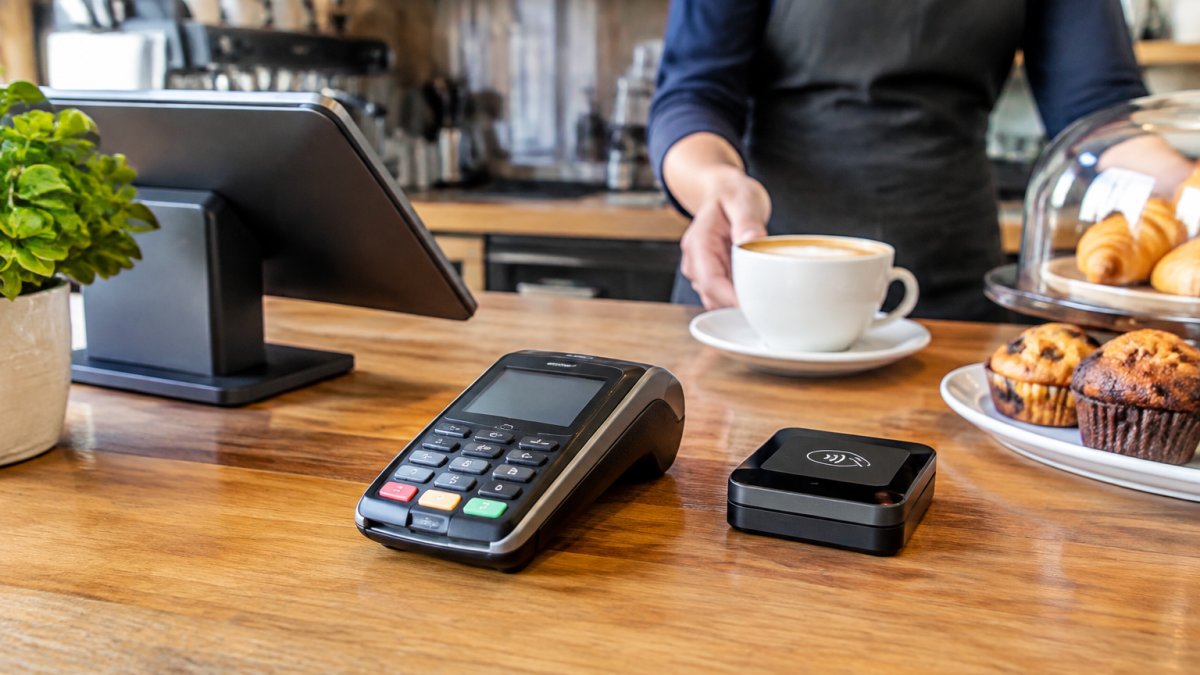
The best mobile card reader for small business runs on cellular or Wi-Fi, fits in a pocket, and doesn't lock you into a contract. It processes payments wherever the customer stands, which matters when your shop is a tent.
Mobile readers connect by Bluetooth to a phone or tablet, or carry their own cellular connection. The trade-offs are real:
- Battery life decides how long you can sell before finding an outlet.
- Connectivity matters more outdoors, where Wi-Fi is often unavailable.
- Offline mode keeps you selling when the signal drops, storing transactions to settle later.
Choosing a Card Reader for Pop-Up Shop and Market Stall Sales
A card reader for a pop-up shop needs to survive a table, a tent, and a queue.

Market stalls add problems a shop never has. Sunlight washes out screens. Dust gets into ports. Rain ends the day early. A portable reader with a protective case and a spare battery solves most of it.
Outdoor reliability: what actually fails at a market
Most card reader roundups rank devices on features and never test them where seasonal sellers work: a parking lot, a fairground, or a sidewalk with no outlet. The failure modes are predictable, and each has a workaround.
- Battery life. Battery life varies by device, so check the manufacturer's stated figures and treat them as a ceiling for continuous use. Carry a USB power bank rated for at least one full phone charge and a spare cable; a reader that dies at 2 p.m. on a Saturday is a lost afternoon of sales.
- Weather exposure. A clear plastic storage bin with a lid, a zippered pouch for the terminal between transactions, and a tent with a side wall do more for uptime than any spec sheet. Avoid direct sun; heat swells batteries and dims screens.
- Weak cellular and Wi-Fi coverage. Venue Wi-Fi is shared, congested, and often password-protected per device. Check with your provider whether the device supports offline payments before opening day.
Temporary staff and peak-season operations
Temporary staff are the other gap competitors miss. Peak-season hires need a reader that takes minutes to learn, not an afternoon; if a new hire can't take a payment on their first shift, you lose sales at the worst moment.
A few operational choices make peak weeks survivable:
- Staff permissions. Where your system supports it, set up individual logins with limited permissions for seasonal hires, and revoke them at season's end.
- Quick training. A one-page card covering the three or four actions a hire needs, take a payment, apply a discount, issue a refund, end the shift, beats a full manual. Run one practice transaction per hire before opening.
- Checkout speed. Contactless taps beat chip inserts, and chip inserts beat manual entry. Position the reader on the customer's side of the table so they can tap without reaching across the goods.
Finding a Card Reader With No Monthly Fee
A card reader with no monthly fee charges per transaction instead of per month, which can cost less for a business selling a few weeks a year.
The catch is the per-transaction rate: a no-monthly-fee reader often costs more per tap than a subscription terminal.
If you want to act on the no-monthly-fee route, you can request a quote from DCATMP to compare current options.
Picking a POS System for Seasonal Business Operations
A POS system for a seasonal business should scale up for peak weeks and down without penalty afterward: month-to-month terms, portable hardware, and reporting that separates one season from the next. You can browse the touchscreen POS systems the business offers for your setup.
The operational gaps matter as much as the hardware, and they are where most guides stop short. A seasonal seller needs a plan for the eleven months the terminal sits in a closet, not just the eight weeks it is on a table.
Seasonal setup, storage, and reactivation
Ask each provider how service is handled between seasons. Confirm the specifics in writing before you sign:
- Pause versus cancel. Ask whether a pause is available and whether resuming requires a new application, and get the answer in writing.
- Monthly fees during the off-season. A terminal with a monthly subscription keeps charging whether or not you sell. If you cannot pause it, the off-season months are pure cost, which is why a no-monthly-fee reader usually wins for intermittent sellers.
- Hardware storage. Remove the battery if possible, store the terminal and cables in a dry bin away from heat, keep the charger with the device, and note the firmware version; a long gap often means an update on power-up.
Seasonal cash-flow and total cost modeling
Comparing readers on sticker price alone misleads seasonal sellers, because the cost that matters is the total across your selling window plus the months you are closed. Model four numbers for each option:
- Upfront hardware cost. A reader at roughly $29 to $39 versus a countertop terminal in the hundreds. For a short season, the low-cost reader usually wins on this line alone.
- Per-transaction fees. Multiply expected seasonal card volume by the quoted rate. A no-monthly-fee reader often costs more per tap, so the gap narrows as volume rises.
- Monthly charges. Multiply the monthly fee by twelve, not by your selling weeks, unless you have confirmed it can be paused. This is where subscription terminals lose to no-monthly-fee readers for short seasons.
- Seasonal minimums and contract terms. Some agreements carry monthly minimums or early-termination fees. A month-to-month agreement with no cancellation fee is worth a slightly higher rate for a business that closes part of the year.
Run the comparison twice, once for a short season and once for a long one, because the answer flips as volume grows. A reader that is cheapest for a six-week holiday stall is rarely cheapest for a six-month tourist-season shop.
Seasonal inventory and multi-location reporting
- Seasonal inventory reporting should let you compare this season to last without rebuilding your product list. Confirm the system lets you archive a season's catalog and restore it rather than deleting products you will need again.
- Multi-location reporting helps if you run several stalls at once. Check whether sales from each temporary location roll up into one report and whether you can close a location without losing its history.
- Temporary product catalogs should be easy to add and remove, so a holiday-only item does not clutter next summer's menu.
Returns, deposits, and post-season support
- Refunds after a temporary location closes. A customer who bought in December may return in January, after the stall is gone. Ask your provider whether refunds can be issued after the terminal is packed away, and decide how you will handle a return with no physical location.
- Deposits. If you take deposits on custom or seasonal goods, confirm the system supports partial payments recorded against the right customer and order.
- Chargebacks. Keep transaction records accessible after the season ends, since chargeback disputes may need receipts and delivery records from earlier months.
For a deeper walkthrough, read our guide to the best POS systems for small business.
Request a Seasonal Card Reader Quote From DCATMP
DCATMP provides merchant services and credit card processing built around flexibility, with no long-term contracts, no cancellation fees, and no upfront equipment costs for qualifying businesses. DCATMP has over 20 years of experience and offers 24/7 support.
For a seasonal seller, that combination matters: free merchant and customer-facing POS systems, free gift cards and rewards programs with credit card processing, and 24/7 support. To learn more about the processing side, see our credit card processing service.
Frequently Asked Questions
What is the best card reader for a seasonal retail business?
There is no single best card reader for every seasonal retailer. The right choice depends on how you sell. A pop-up shop that moves locations needs a portable reader with cellular connectivity, while a fixed retail counter can use a countertop terminal. Compare hardware cost, transaction fees, monthly fees, and contract terms before deciding. Ask providers whether you can pause or store equipment during the off-season, and whether that carries any penalties.
Can I use a card reader only during certain months?
Yes, but check the contract first. Some providers charge monthly fees or minimum volume requirements year-round, which eats into seasonal margins. A month-to-month option lets you process payments during peak months and pause when sales slow, if your provider allows it. Confirm the reactivation terms and any cancellation fees if you skip a season entirely.
Do I need Wi-Fi to accept card payments with a mobile reader?
Not always. Many mobile readers connect through Bluetooth to a phone or tablet, using the device's cellular data. Others include a built-in SIM card for cellular connection. For outdoor markets and pop-up shops where Wi-Fi is unreliable, choose a reader with cellular or offline payment support so you can keep accepting card-present transactions even when the signal drops.
What fees should seasonal retailers compare when choosing a card reader?
Compare four costs: hardware price, per-transaction processing rates, monthly fees, and contract terms. A low hardware cost can hide higher processing rates over a busy season. Ask about chargeback fees, refund handling, and whether rates change by card type. For a seasonal business, the total seasonal cost matters more than any single fee, so model your expected volume against each provider's rates.
A seasonal business shouldn't pay for payment hardware it isn't using. If your current reader charges you through the off-season, or you're setting up a stall for the first time, DCATMP can help you match a terminal to your selling window. Get started with DCATMP and request a quote for a seasonal card reader that fits how you actually sell.